 Office Energy Monitor
 Product Review Hub
 Amazon Niche Finder
 Sudo WhatsApp Bot
 Landsat Lens
 Roots AI
 NDITC Official Mobile Application
 AIDE Assistant
 OffLearn GK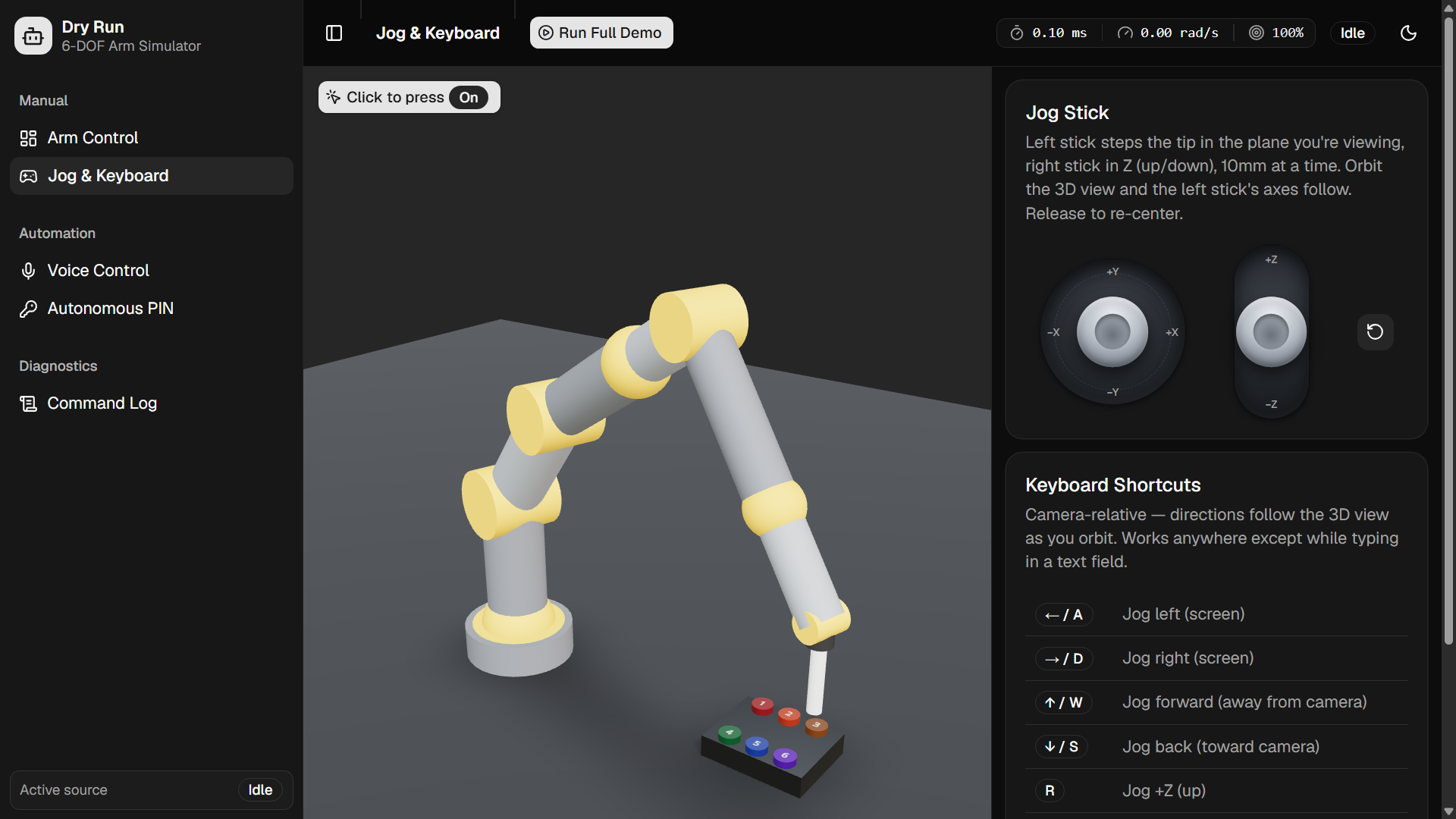
Robo Arm Simulator — 6-DOF Arm Simulator
A browser-based 6-DOF robotic arm simulator and control suite. Visualize, manually control, and autonomously operate a 6-axis industrial arm entirely client-side — no real hardware, no backend IK, no physics engine. Every motion passes through a single centralized pipeline, proving the same control software is trustworthy on real hardware.
Features
3D Visualization & Dashboard
- URDF-loaded 6-DOF arm rendered in real-time via React Three Fiber with orbit controls, shadows, and HDRI lighting
- Live dashboard showing all 7 joint angles with sliders, editable Cartesian XYZ position, and IK solve-on-commit
- Per-joint safe travel ranges dynamically computed from the current pose to prevent self-collision
- 6-key test panel rendered from coordinates with colored keycaps, hover glow, and physical press animation
- Click-to-press interaction directly in the 3D scene — hover a key, click, and watch the arm approach, touch, and retract
- Ground plane with contact shadows for spatial reference
- Camera-relative axes — the jog pad always moves the arm in the plane you're looking at
- Contact-surface clamping — the stylus tip is never allowed below the keypad or floor surface under it
Inverse Kinematics
- Closed-form 7-joint IK with a vertical-stylus constraint (stylus always points straight down)
- 2-link law-of-cosines solve for the elbow, approach-angle scan over a downward cone to find the most natural pose
- Seed-based selection — continuous jogs pick the solution closest to the current pose, preventing elbow snapping
- Roll joints (J4, J6) decoupled from TCP position for cleaner solves
- Single elbow-down branch — one deterministic configuration per target, no ambiguity
Forward Kinematics
- Full URDF transform chain via 3D rotation matrices returning all 8 joint origins plus TCP
- Verified against an independent implementation with 5000-sample random workspace sweep — all errors < 0.001mm
Manual Control
- Jog Pad — Two virtual sticks (round XY + vertical Z) with 10mm steps, 120ms auto-repeat, deadzone detection, spring-back on release
- Keyboard — Arrow keys and WASD for XY jog, R/F for Z up/down, modifier-aware so it doesn't interfere with text input
- Dashboard Sliders — Direct joint control with safe dynamic ranges; Cartesian XYZ input fields with IK solve on commit
- Pointer (3D Scene) — Click a keycap to trigger a full press cycle; hover glow and press animation
- All control surfaces route through the same
dispatch()→resolveCommand()pipeline
Voice Control
- Deterministic grammar — keywords like "move up", "rotate base 30 degrees", "press key 1", "go home" mapped directly to motion commands. No API key required.
- Web Speech API — browser-native continuous recognition with hands-free mode (2-second silence detection for sustained voice operation)
- AI Agent mode — free-form natural language interpreted by an LLM reasoning layer into structured multi-step motion plans
- TTS feedback — browser speech synthesis confirms what was understood and reports success/failure
- Whisper fallback — Groq Whisper STT proxy when Web Speech API is unavailable
AI Agent Layer
- LLM provider abstraction: API-backed (Groq, Gemini, OpenRouter via server-side proxy) and deterministic rule-based fallback (works without any API key)
- Schema-constrained output — plans validated against a strict JSON schema with max 24 steps
- Few-shot prompting with 5 worked examples covering multi-step, repetition, ambiguity, and out-of-scope requests
- Dry-run validation — entire plan executed through
resolveCommand()with simulated pose chaining before a single motor moves - Natural language responses — composes replies from understanding + execution results (successes, failures, rejections)
- Conversation memory — last 4 turns fed back for context continuity
Autonomous PIN Entry
- 6-digit PIN input (digits 1–6 only) mapped to a physical key panel
- For each digit: approach 8cm above → descend → dwell 300ms → measure FK error → retract
- Success tolerance: ±5mm checked against real FK output, not IK input
- Speed control slider (0.25x–4x) scaling animation duration
- Per-key results table showing hit/miss/unreachable/cancelled with mm error
- Abort handling — manual input during a sequence cancels it safely
Real-Time Collision Detection
- Floor penetration check on all joint origins
- Segment-vs-segment self-collision detection (non-adjacent link pairs) using Ericson's closest-points algorithm
- Link radius of 0.045m — two segments closer than this are flagged as intersecting
- Runs after every command in the safety gate; collisions cause rejection with a human-readable reason
Velocity-Limited Motion
- Per-joint URDF velocity limits (rad/s): J1 2.5 through J7 5.0
- Move duration derived from the slowest joint — no joint exceeds its rated speed
- Smootherstep interpolation (Ken Perlin's
6t⁵ − 15t⁴ + 10t³) for zero-velocity, zero-acceleration at both endpoints - Global speed multiplier (0.25x–4x) applied across all animated control surfaces
Live Hardware Bridge (MQTT)
- Full MQTT-over-WebSocket connection to a physical ESP32-driven arm
- Real-time telemetry: joint angles, servo degrees, RSSI, motion status
- MQTT control console with joint sliders, raw command input, and command templates
- 3D preview scene driven by live device telemetry
- Topic contract:
vantage/arm/<ID>/cmd|state|event|statuswith LWT for disconnect detection - Defence-in-depth: browser enforces safety, ESP32 re-clamps on-device
/live/controller— standalone MQTT control page with connection panel, 7 joint sliders with live send, raw command textarea, telemetry table, and message log. Works independently of the main simulator UI./live/preview— standalone 3D preview page driven entirely by live device telemetry. Shows the physical arm's state in real-time with joint status, RSSI, and motion indicators. Useful for monitoring an arm without the full control interface.
Command History & Audit Log
- Every motion command logged with timestamp, source badge (dashboard / jogpad / keyboard / voice / auto / agent / pointer), command detail, and result
- Reverse-chronological scrollable table with total/ok/rejected counters
Demo System
- Scripted 5-phase tour: Visualize → Jog → Voice → PIN → AI Agent
- Drives the real on-screen controls via a cue bus (not behind-the-scenes dispatch)
- Live progress badge, phase switching, and component-level cue reception
Dark Mode
- Full dark/light theme toggle via next-themes with semantic Tailwind tokens
ESP32 Firmware
- Complete firmware for Wi-Fi-controlled servo arm (ESP32 + PCA9685 + 7 servos)
- Velocity-limited servo slew mirroring the browser's motion timing
- On-device joint limit clamping as defence-in-depth
- Telemetry at 200ms (moving) / 1s (idle), LWT for disconnect detection
- Wokwi-runnable circuit diagram included
- Full electrical schematic with pin maps, power rails, and BOM

Verification Suite
6 independent scripts proving pipeline correctness:
| Script | What it checks |
|---|---|
scripts/fk-verify.mjs | FK chain against URDF — all 6 keys within 5mm, 5000-sample workspace sweep |
scripts/collision-verify.mjs | Home, key touch, and approach poses pass collision check |
scripts/voice-verify.mjs | Grammar mappings, rotation math, gibberish rejection |
scripts/geometry-sync-verify.mjs | Runtime URDF → ARM/IK geometry sync, partial/renamed joint tolerance |
scripts/agent-verify.mjs | JSON extraction, schema validation, plan determinism, unit conversions |
scripts/urdf-safety-verify.mjs | applyJointAngles edge cases: null, non-finite, renamed joints |
Architecture
Every control surface produces the same MotionCommand and calls dispatch() / dispatchAnimated(), which routes through resolveCommand() — the single gate:
Dashboard ──┐
Jog Pad  ───┤
Keyboard ───┼─► dispatch(cmd) / dispatchAnimated(cmd) ─► resolveCommand(cmd)
Voice ──────┤                                              ├─► IK (if jog / moveTo)
Auto-PIN ───┤                                              ├─► safetyCheck (joint limits, collision, contact clamp)
Agent  ─────┤                                              ├─► reject + reason, OR
Pointer ────┘                                              └─► velocity-limited animate ─► store.angles
                                                                                               │
                                                                                               ▼
                                                                        ArmScene reads `angles`, drives URDF
Non-negotiable rules:
resolveCommand()is the only function that turns aMotionCommandinto joint anglesArmSceneis a pure reader — subscribes toangles, applies them to the URDF every frame, never writes state- Joint limits and velocity limits are enforced once, centrally — never re-implemented per control surface
- Every command — including AI agent-generated ones — passes through
dispatch()→resolveCommand()→ safety check - Contact surfaces (floor, keypad) are clamped in the pipeline, never in the scene
Tech Stack
| Layer | Choice | Why |
|---|---|---|
| Framework | Next.js 16 (React 19) | App router, API routes for agent/STT proxies |
| Language | TypeScript 6 | Type safety across the kinematic pipeline |
| Styling | Tailwind CSS v4 + tw-animate-css | Utility-first, semantic tokens, CSS animations |
| UI Components | shadcn v4 / @base-ui/react | Accessible, composable primitives — no raw HTML controls |
| 3D Rendering | React Three Fiber + drei | Declarative Three.js, useFrame for per-frame updates |
| URDF Parsing | urdf-loader | Standard URDF → Three.js group conversion |
| State | Zustand | Zero-boilerplate, selector-based subscriptions |
| Voice | Web Speech API | Browser-native, no API key, works offline |
| MQTT | mqtt (over WebSocket) | Browser-side MQTT client for live hardware bridge |
| Icons | lucide-react | Tree-shakeable, consistent icon set |
| Toasts | sonner | Lightweight toast notifications |
| Layout | react-resizable-panels | Sidebar + viewport split |
| Animation | tw-animate-css | Tailwind-compatible CSS animations |
Getting Started
Prerequisites
- Node.js 18+
- pnpm (required —
npm/yarnnot tested)
1. Install Dependencies
pnpm install
2. Set Up Environment Variables
Copy the example env file and configure as needed:
cp .env.example .env.local
The .env.local file is optional — the simulator works out of the box with zero configuration. Environment variables only need to be set for:
| Variable | Purpose | When to set |
|---|---|---|
GROQ_API_KEY | LLM agent + Whisper STT fallback | Only if you want AI agent mode or STT fallback |
OPENROUTER_API_KEY | Alternative LLM provider | Only if using OpenRouter instead of Groq |
GEMINI_API_KEY | Alternative LLM provider | Only if using Google Gemini |
AGENT_API_KEY + AGENT_API_BASE_URL | Custom OpenAI-compatible endpoint | Only if using a self-hosted or custom LLM |
AGENT_MODEL | Override the LLM model name | Optional; defaults vary by provider |
WHISPER_MODEL | Override Whisper STT model | Optional; defaults to whisper-large-v3-turbo |
AGENT_PROVIDER | Label for custom provider in the UI | Optional; shown when using a custom endpoint |
NEXT_PUBLIC_MQTT_URL | MQTT broker WebSocket URL | Only for live hardware bridge |
NEXT_PUBLIC_MQTT_DEVICE_ID | ESP32 device ID | Only for live hardware bridge |
NEXT_PUBLIC_MQTT_USERNAME | MQTT broker username | Only for live hardware bridge |
NEXT_PUBLIC_MQTT_PASSWORD | MQTT broker password | Only for live hardware bridge |
3. Run Development Server
pnpm dev
Open http://localhost:3000 in your browser.
4. Other Commands
# Build for production
pnpm build

# Start production server
pnpm start

# Type check
pnpm typecheck

# Lint
pnpm lint

# Format
pnpm format
5. Run Verification Scripts
node scripts/fk-verify.mjs
node scripts/collision-verify.mjs
node scripts/voice-verify.mjs
npx tsx scripts/geometry-sync-verify.mjs
node scripts/agent-verify.mjs
node scripts/urdf-safety-verify.mjs
ESP32 Firmware (Hardware)
Full hardware documentation, circuit diagram, Wokwi setup, MQTT topic contract, and BOM are documented in
hardware/README.md.
The ESP32 firmware can be simulated in Wokwi without physical hardware.
Quick Start
# Build the firmware
cd hardware
pio run
- Go to wokwi.com and create a new ESP32 project
- Replace the default
diagram.jsonwith the contents ofhardware/diagram.json - Upload the compiled firmware from
hardware/.pio/build/esp32doit-devkit-v1/firmware.bin - Click Start Simulation — you should see
[wifi] okthen[mqtt] connected
Publish to vantage/arm/vantage-arm-01/cmd to drive the simulated arm:
{ "type": "home" }
Project Structure
├── public/
│   ├── 6_dof_arm.urdf          # URDF model (served as-is)
│   ├── key.config.json         # 6-key panel coordinates
│   └── favicon.svg             # Browser tab icon
│
├── src/
│   ├── core/                   # Pure TS — the pipeline (no React/Three)
│   │   ├── types.ts            # JointAngles, Vec3, MotionCommand, limits, ARM/IK geometry
│   │   ├── fk.ts               # Forward kinematics (angles → TCP xyz)
│   │   ├── ik.ts               # Inverse kinematics (target → angles)
│   │   ├── safety.ts           # Joint-limit safety check
│   │   ├── collision.ts        # Floor + self-collision checks
│   │   ├── motionTiming.ts     # Velocity-limited move duration
│   │   ├── pipeline.ts         # resolveCommand() — the single gate
│   │   ├── pressKey.ts         # Key press: approach → touch → retract
│   │   ├── describe.ts         # Human-readable command descriptions
│   │   ├── jointRange.ts       # Safe dynamic joint limits
│   │   └── agent/              # AI agent layer
│   │       ├── schema.ts       # AgentPlan types + validation
│   │       ├── planner.ts      # JSON extraction + dry-run check
│   │       ├── prompt.ts       # System prompt + few-shot examples
│   │       ├── executor.ts     # Run agent turn → execute → reply
│   │       └── llm/            # Provider abstraction
│   │           ├── types.ts    # LlmProvider contract interface
│   │           ├── api.ts      # Server-side API proxy
│   │           ├── fallback.ts # Deterministic rule-based parser
│   │           └── index.ts    # Provider factory
│   │
│   ├── state/
│   │   └── armStore.ts         # Zustand: angles, tcp, dispatch, animateTo
│   │
│   ├── scene/                  # R3F: pure readers, never write state
│   │   ├── ArmScene.tsx        # Full-viewport Canvas + OrbitControls
│   │   ├── RobotModel.tsx      # URDF loader + per-frame angle application
│   │   ├── KeyPanel.tsx        # 6-key test fixture with click-to-press
│   │   ├── WorkCell.tsx        # Ground plane + contact shadows
│   │   ├── CameraAxisTracker.tsx # Camera-relative jog axes
│   │   ├── SceneControls.tsx   # Click-to-press toggle overlay
│   │   ├── robotGeometry.ts    # Runtime URDF → ARM/IK geometry sync
│   │   └── applyJointAngles.ts # URDF joint name mapping
│   │
│   ├── controls/               # Manual control surfaces
│   │   ├── Dashboard.tsx       # Joint sliders + position inputs
│   │   ├── JogPad.tsx          # XY + Z virtual sticks
│   │   ├── useKeyboardControl.ts # Arrow/WASD/R/F bindings
│   │   ├── VoiceControl.tsx    # Direct + Agent voice modes
│   │   ├── CommandLog.tsx      # Reverse-chronological history
│   │   ├── StatsPanel.tsx      # IK solve time, velocity, success rate
│   │   ├── DemoButton.tsx      # Run Full Demo toggle
│   │   ├── fullDemo.ts         # Scripted 5-phase tour
│   │   ├── demoCues.ts         # One-shot event channel for demo
│   │   ├── ResetButton.tsx     # One-click return to home pose
│   │   ├── useMicLevel.ts      # Microphone level for voice UI
│   │   └── KeyboardHint.tsx    # Reference table
│   │
│   ├── auto/
│   │   └── PinEntry.tsx        # PIN → key sequence → touch
│   │
│   ├── live/                   # Live hardware bridge (MQTT)
│   │   ├── armMqtt.ts          # Topic contract + servo mapping
│   │   ├── useArmMqtt.ts       # MQTT-over-WebSocket hook
│   │   ├── liveArmStore.ts     # Mirror of physical arm telemetry
│   │   ├── Controller.tsx      # Full MQTT control console
│   │   ├── ControllerApp.tsx   # Client wrapper for controller page
│   │   ├── ControllerEntry.tsx # Page entry for /live/controller
│   │   ├── Preview.tsx         # 3D preview driven by live telemetry
│   │   ├── PreviewApp.tsx      # Client wrapper for preview page
│   │   ├── PreviewEntry.tsx    # Page entry for /live/preview
│   │   ├── LiveProviders.tsx   # Theme provider for live pages
│   │   ├── LiveRobotModel.tsx  # URDF model reading from live store
│   │   ├── LivePreviewScene.tsx # Full scene for preview
│   │   └── LiveKeyPanel.tsx    # Read-only key panel for preview
│   │
│   ├── components/             # App chrome + shadcn/ui primitives
│   │   ├── AppShell.tsx        # StrictMode + ThemeProvider wrapper
│   │   ├── AppSidebar.tsx      # Navigation sidebar
│   │   ├── DynamicApp.tsx      # Dynamic import (SSR disabled)
│   │   ├── ModeToggle.tsx      # Dark/light theme toggle
│   │   ├── SceneErrorBoundary.tsx # Error boundary for 3D scene
│   │   ├── theme-provider.tsx  # next-themes provider
│   │   └── ui/                 # shadcn components (25 primitives)
│   │       ├── alert-dialog.tsx, alert.tsx, badge.tsx, button.tsx
│   │       ├── card.tsx, input-otp.tsx, input.tsx, label.tsx
│   │       ├── progress.tsx, resizable.tsx, scroll-area.tsx
│   │       ├── select.tsx, separator.tsx, sheet.tsx, sidebar.tsx
│   │       ├── skeleton.tsx, slider.tsx, sonner.tsx, switch.tsx
│   │       ├── table.tsx, tabs.tsx, textarea.tsx, toggle-group.tsx
│   │       ├── toggle.tsx, tooltip.tsx
│   │
│   ├── hooks/
│   │   └── use-mobile.ts       # Mobile breakpoint detection
│   │
│   ├── lib/
│   │   └── utils.ts            # cn() utility for Tailwind
│   │
│   ├── utils/
│   │   └── keyConfig.ts        # Typed loader for key.config.json
│   │
│   ├── assets/                 # Static assets directory
│   │
│   ├── fontsource.d.ts         # Type declarations for Geist font
│   │
│   ├── app/                    # Next.js App Router
│   │   ├── layout.tsx          # Root layout (Geist font, metadata)
│   │   ├── page.tsx            # Main simulator page
│   │   ├── globals.css         # Tailwind CSS + theme tokens
│   │   ├── api/
│   │   │   ├── agent/route.ts  # LLM proxy (server-side key)
│   │   │   └── stt/route.ts    # Whisper STT proxy
│   │   └── live/
│   │       ├── controller/     # /live/controller page
│   │       └── preview/        # /live/preview page
│   │
│   └── App.tsx                 # Main app component (sidebar + viewport)
│
├── hardware/                   # ESP32 firmware + Wokwi circuit
│   ├── diagram.json            # Wokwi circuit definition
│   ├── src/main.cpp            # ESP32 firmware (MQTT + servo control)
│   ├── platformio.ini          # Build config + library deps
│   ├── wokwi.toml              # Wokwi firmware path config
│   ├── include/                # PlatformIO auto-generated includes
│   ├── lib/                    # PlatformIO auto-generated libs
│   ├── test/                   # PlatformIO test harness
│   ├── docs/circuit.png        # Circuit diagram image
│   └── README.md               # Full hardware documentation
│
├── scripts/                    # Verification scripts
│   ├── fk-verify.mjs           # FK verification
│   ├── collision-verify.mjs    # Collision verification
│   ├── voice-verify.mjs        # Voice grammar verification
│   ├── geometry-sync-verify.mjs # URDF geometry sync verification
│   ├── agent-verify.mjs        # Agent schema/determinism tests
│   └── urdf-safety-verify.mjs  # URDF safety edge cases
│
├── .env.example                # Environment variable template
├── .prettierrc                 # Prettier config
├── .prettierignore             # Prettier ignore rules
├── components.json             # shadcn/ui configuration
├── eslint.config.js            # ESLint flat config
├── next.config.ts              # Next.js config (Three.js transpile)
├── next-env.d.ts               # Next.js type declarations
├── package.json                # Dependencies and scripts
├── pnpm-lock.yaml              # Lock file
├── pnpm-workspace.yaml         # pnpm workspace config
├── postcss.config.mjs          # PostCSS + Tailwind
└── tsconfig.json               # TypeScript config
Acknowledgements
This project was originally developed for the Hackathon Segment Final Round of Techathon Nationals & Rover Summit - a national event organized by IUT Robotics Society. We are proud to have the 5th position in the final round of the competition.
Team members: